A language model on its own can’t answer questions about your data — your docs, your policies, your codebase. It answers from training data: often plausible, sometimes wrong, never grounded in your source of truth. Retrieval-Augmented Generation (RAG) fixes this with a simple idea: when a question arrives, retrieve the relevant passages from your documents, put them in the prompt, and let the model answer from that context.
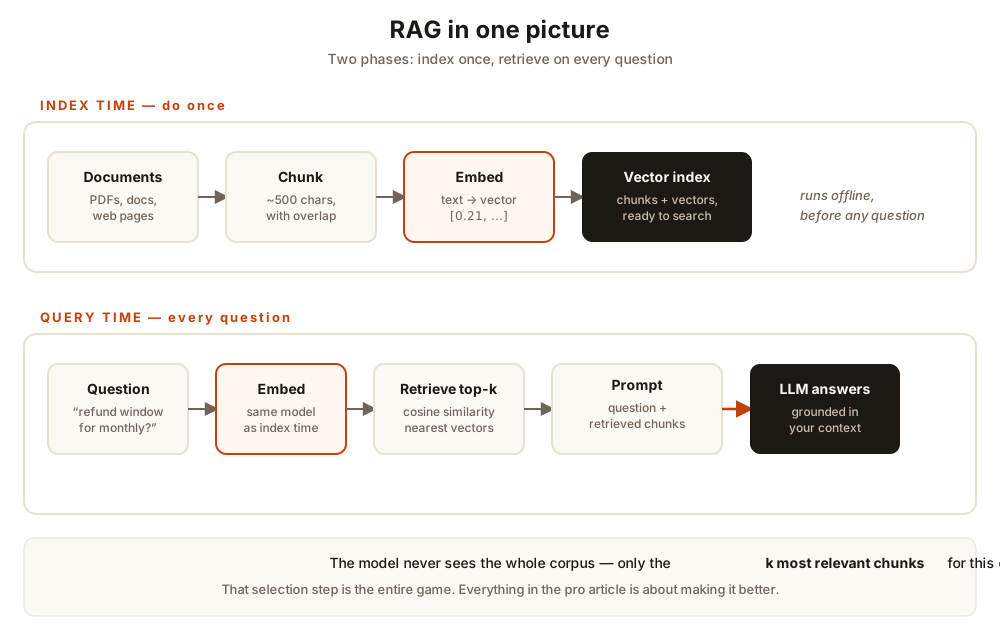
The five moving parts
LangChain’s RAG tutorial breaks the system into the same pieces every implementation shares:
- Chunk — split documents into small passages. Large chunks are harder to search and waste context; small focused chunks retrieve cleanly.
- Embed — convert each chunk into a numeric vector that captures its meaning. Similar meanings land close together in vector space.
- Store — index chunks and their vectors so you can search them fast.
- Retrieve — embed the question with the same model, find the k nearest chunk vectors (cosine similarity).
- Generate — prompt the model with the question plus the retrieved chunks, and instruct it to answer only from that context.
Steps 1–3 run once, offline. Steps 4–5 run per question. That separation is the whole architecture.
Build it: a complete RAG in ~80 lines
No frameworks, no API keys. We’ll use TF-IDF vectors (word-overlap scoring) instead of neural embeddings so the entire pipeline runs anywhere with just pip install scikit-learn numpy. The architecture is identical — embeddings are a drop-in upgrade we’ll do at the end.
import numpy as np
from sklearn.feature_extraction.text import TfidfVectorizer
from sklearn.metrics.pairwise import cosine_similarity

DOCS = [
    """Acme Cloud Refund Policy. Customers on monthly plans may request a full
    refund within 30 days of purchase. Annual plans may be refunded within 60
    days, prorated after the first 30 days. Refunds are issued to the original
    payment method within 5-10 business days. Usage-based overages are not
    refundable.""",
    """Acme Cloud Support Hours. Standard support is available Monday to Friday,
    9am-6pm Eastern, with a 4-hour first-response SLA. Enterprise customers get
    24/7 phone support with a 30-minute first-response SLA for severity-1
    incidents.""",
    # ... add your own documents here: pricing, SLA, data residency ...
]

def chunk_text(text: str, chunk_words: int = 60, overlap_words: int = 15):
    """Word-based chunking with overlap so context survives boundaries."""
    words = text.split()
    chunks, start = [], 0
    while start < len(words):
        end = min(start + chunk_words, len(words))
        chunks.append(" ".join(words[start:end]))
        if end == len(words):
            break
        start = end - overlap_words
    return chunks

CHUNKS = [c for doc in DOCS for c in chunk_text(doc)]

# Index: one TF-IDF vector per chunk
vectorizer = TfidfVectorizer(stop_words="english")
chunk_vectors = vectorizer.fit_transform(CHUNKS)

def retrieve(query: str, k: int = 2):
    """Return the k most similar chunks (cosine similarity)."""
    q = vectorizer.transform([query])
    sims = cosine_similarity(q, chunk_vectors)[0]
    top = np.argsort(sims)[::-1][:k]
    return [(CHUNKS[i], float(sims[i])) for i in top]

def build_prompt(query: str, contexts):
    context_block = "\n\n".join(
        f"[Source {i+1}]\n{c}" for i, (c, _) in enumerate(contexts)
    )
    return f"""Answer the question using ONLY the context below. If the answer
is not in the context, say "I don't know based on the provided documents."

Context:
{context_block}

Question: {query}
Answer:"""

def ask(question: str, k: int = 2):
    contexts = retrieve(question, k=k)
    return build_prompt(question, contexts), contexts
Two things to notice. First, the prompt does real work: the “answer ONLY from the context” instruction plus the explicit “I don’t know” fallback is what keeps the model grounded instead of hallucinating. Second, every chunk is labeled [Source N] — citeable answers are a habit worth building from day one.
Try it live
This demo runs the exact pipeline above in your browser — same corpus, same chunking, same TF-IDF math. Ask a question and watch the scores:
Notice what happens with a question the corpus can’t answer: every score collapses toward zero. That near-zero score is a feature — it’s your signal to return “I don’t know” instead of letting the model invent an answer.
Upgrade 1: real embeddings
TF-IDF only matches literal words — it can’t tell that “reimbursement period” means the same as “refund window.” Neural embeddings fix that: the sentence-transformers library maps each chunk to a dense vector where meaning determines distance. The swap is small:
from sentence_transformers import SentenceTransformer

model = SentenceTransformer("sentence-transformers/all-MiniLM-L6-v2")
chunk_vectors = model.encode(CHUNKS, normalize_embeddings=True)

def retrieve(query: str, k: int = 2):
    q = model.encode([query], normalize_embeddings=True)
    sims = (q @ chunk_vectors.T)[0]  # cosine = dot product on normalized vectors
    top = sims.argsort()[::-1][:k]
    return [(CHUNKS[i], float(sims[i])) for i in top]
The API (SentenceTransformer(...), .encode(...)) is straight from the sentence-transformers quickstart, and all-MiniLM-L6-v2 produces 384-dimensional vectors — a solid default for semantic search. One rule that never changes: embed queries with the same model you used for the chunks, or the vectors live in different spaces and similarity is meaningless.
Upgrade 2: a real generator
So far our “answer” was the top chunk verbatim. Point the prompt at any chat model instead. With Ollama running locally, it’s the standard OpenAI-compatible call (Ollama exposes /v1/chat/completions and ignores the API key value):
from openai import OpenAI

def generate(prompt: str, model: str = "llama3.1:8b") -> str:
    client = OpenAI(base_url="http://localhost:11434/v1", api_key="ollama")
    resp = client.chat.completions.create(
        model=model,
        messages=[{"role": "user", "content": prompt}],
        temperature=0,  # deterministic answers for factual Q&A
    )
    return resp.choices[0].message.content
That’s the complete system: chunk → embed → store → retrieve → prompt → generate. The core pipeline above was executed end-to-end to verify it works; the two upgrade snippets follow their libraries’ documented APIs (linked below).
Where this breaks (and what’s next)
This starter is honest but naive, and you should know its limits before shipping anything:
- Chunking is crude. Fixed word windows slice sentences in half. Production systems use recursive, structure-aware splitting.
- One retriever, one ranking. TF-IDF misses synonyms; pure dense search misses exact codes like
SKU-8842. Production retrieval is hybrid. - No reranking. The top-k from vector search is a rough cut — a second, precise model usually reorders it.
- No evaluation. The demo worked on two questions. You need a harness that proves it works on two hundred.
Each of those is a solved problem with real trade-offs — that’s the subject of the companion piece, RAG in Production.
Sources & further reading
- LangChain RAG tutorial — the load → split → embed → store indexing pipeline and retrieve → generate query path this article follows
- Sentence Transformers quickstart —
SentenceTransformer,.encode(), and the bi-encoder → cross-encoder reranking pattern - Ollama OpenAI compatibility —
/v1/chat/completionsagainst a local server - Faiss README — when your index outgrows brute-force search: exact, compressed, and graph-based vector indexes